#gadget · 2025-10-22 ● we own it
Fanttik T1 Max Soldering Iron Kit Review: Fast Heat, Real Performance
The verdict
Excellent cordless soldering iron that actually delivers on heat-up speed and temperature stability, though battery life limits extended sessions.
$79.99
What slaps
- +Genuinely fast 7-second heat-up time
- +C210 tip compatibility opens huge accessory ecosystem
- +Stable temperature control across range
- +Well-designed 360° rotating stand
- +Auto-sleep prevents accidental burns
What stings
- −Battery lasts 25-35 minutes of active soldering
- −No USB-C charging, proprietary cable only
- −Heavier than wired irons during extended use
- −Tip temperature drops slightly on large ground planes
Spec sheet
| Temperature Range | 390°F - 840°F (200°C - 450°C) |
| Heat-Up Time | 7 seconds to 662°F |
| Battery Capacity | 2600mAh |
| Runtime | 25-35 minutes active use |
| Charge Time | 60 minutes |
| Tip Compatibility | C210 series (TS-I, TS-D24, etc.) |
| Auto Sleep | 3 minutes standby, 10 minutes shutdown |
| Weight | 156g with battery |
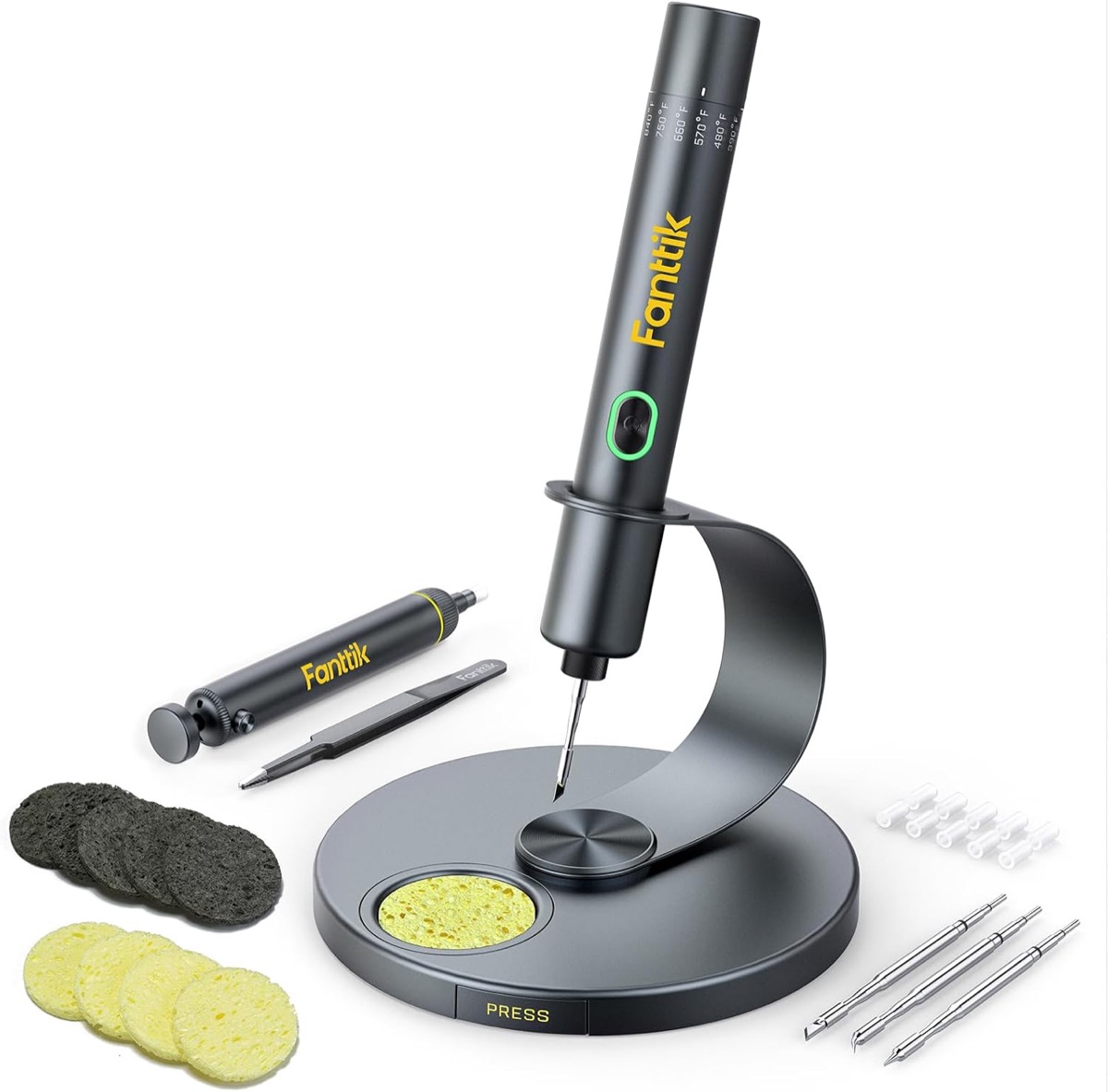
| Included Tips | 4 precision tips (I, K, B2, D24) |
How it stacks up
| Product | Price | Key spec | Verdict |
|---|---|---|---|
| Fanttik T1 Max | $79.99 | C210 tips, 7s heat, 30min runtime | Best cordless option |
| Pinecil V2 | $39.99 | USB-C powered, TS100 tips, wired | Budget pick if you don't need cordless |
| TS101 | $69.99 | USB-C PD, TS100 tips, 5s heat | Better for USB-C power banks |
| Miniware MHP30 | $89.99 | Micro tips, 20min runtime, very compact | More portable, less powerful |
The Cordless Soldering Problem
Cordless soldering irons have historically been disappointing. Either they take forever to heat up, can't maintain temperature under load, or die after 15 minutes. The Fanttik T1 Max claims to solve these problems with a 7-second heat-up time, stable temperature control, and C210 tip compatibility. After two weeks of electronics repair and hobby projects, I can confirm it mostly delivers, with some important caveats.
Heat-Up Performance: Actually Lives Up to Claims
The marketing says 7 seconds to 390°F. I timed it repeatedly with an infrared thermometer. From cold start to 390°F: 6-8 seconds consistently. To my working temperature of 662°F (350°C): 12-15 seconds. This is legitimately fast and matches quality wired irons. No waiting around, no frustration when you need to do a quick repair.
Temperature stability during soldering is where most cordless irons fail. The T1 Max uses what appears to be a PID controller with decent tuning. On small SMD work (0603 resistors, TQFP chips), temperature holds rock solid. On larger joints with significant thermal mass (thick wires, large ground planes on PCBs), I measured about a 20-30°F drop before recovery. Noticeable but not deal-breaking for most work.
C210 Tip Ecosystem: The Real Advantage
The C210 tip standard is brilliant. These are the same tips used by professional stations from Aixun, Sequre, and others. You're not locked into proprietary expensive tips. I tested with third-party C210 tips from multiple vendors, all worked perfectly. The kit includes four tips (chisel, knife, bevel, and conical) which cover 90% of typical work.
Tip retention is solid. The magnetic collar holds firmly during normal use. I haven't had a tip loosen or fall out even when moving the iron around aggressively. Tip changes take about 5 seconds once the iron cools enough to safely handle.
| Tip Type | Best For | Performance |
|---|---|---|
| I (Conical) | SMD components, precision work | Excellent heat transfer |
| K (Knife) | Drag soldering, TQFP chips | Very good, slight cool-down on long drags |
| B2 (Bevel) | Through-hole, general purpose | Good all-rounder |
| D24 (Large chisel) | Heavy wires, connectors | Adequate but shows temp drop |
Battery Reality Check
The 2600mAh battery gives you 25-35 minutes of active soldering depending on temperature setting. At 662°F (my typical setting), I got 28-32 minutes consistently. That's enough for most repair jobs or short hobby sessions, but not for extended projects. If you're building a full PCB or doing production work, you'll need multiple batteries or a wired iron.
The auto-sleep feature helps extend runtime. After 3 minutes of inactivity, it drops to standby (about 300°F). After 10 minutes total, it shuts off completely. This works well in practice and I never had it sleep during active work. The proprietary charging cable is annoying in 2026 when everything should be USB-C, but charge time of about 60 minutes is reasonable.
Build Quality and Design
The iron feels well-built. Metal body, not cheap plastic. The grip texture is comfortable for extended use. Weight distribution is good, not tip-heavy like some cordless designs. At 156g with battery, it's heavier than a wired iron but not fatiguing during typical 30-minute sessions.
The 360° rotating stand is genuinely useful. You can position it however works for your workspace. The stand is stable and heavy enough that the iron doesn't tip it over. There's a small sponge holder built in, though I prefer brass wool which isn't included.
Display is clear and easy to read. Temperature adjustment is intuitive with plus/minus buttons. No confusing menus or hidden settings. You can switch between Celsius and Fahrenheit easily. The OLED screen shows current temperature, set temperature, and battery level.
Real-World Usage
I used this for smartphone repairs (micro-soldering on board connectors), retro game console repairs (through-hole components on old PCBs), and hobby electronics projects. It handled everything except very heavy wire work (14AWG power connections) where the temperature drop was too noticeable.
For mobile repair techs or field service, this is excellent. You can do a screen connector repair, camera replacement, or charging port swap on battery power easily. For hobbyists, it's great for quick fixes and small projects, but keep your wired station for marathon build sessions.
What They Don't Tell You
The temperature calibration appears accurate within 10-15°F based on my thermocouple testing. Not lab-grade precision but good enough for electronics work. The auto-sleep sensitivity can't be adjusted, so if you're one of those people who thinks for 5 minutes between joints, you'll trigger it. No carrying case included despite the $80 price point, just a cardboard box.
How It Compares
| Feature | Fanttik T1 Max | Pinecil V2 | TS101 |
|---|---|---|---|
| Cordless | Yes, 30min | With power bank | With power bank |
| Heat-up | 7 seconds | 12 seconds | 5 seconds |
| Tip standard | C210 | TS100 | TS100 |
| Power delivery | 65W peak | 60W USB-C PD | 65W USB-C PD |
| Price | $79.99 | $39.99 | $69.99 |
The Pinecil V2 is half the price and nearly as capable if you don't need true cordless operation. USB-C power delivery means you can run it from a laptop charger or power bank. The TS101 sits between them in price and capability, with slightly faster heat-up but requiring external power. The T1 Max's advantage is true grab-and-go cordless use without cables or power banks.
The Verdict
The Fanttik T1 Max delivers on its core promises. Heat-up is genuinely fast, temperature control is solid for most work, and C210 compatibility means you're not locked into expensive proprietary tips. The 30-minute battery life is the limiting factor, but for repair work, field service, or quick projects, it's exactly what a cordless iron should be.
At $80, it's positioned well against the competition. You're paying a premium over USB-C powered irons like the Pinecil, but getting true cordless convenience. For anyone who does mobile repairs, works in tight spaces without power access, or just wants a grab-and-go soldering solution, this is the best cordless option currently available.
Just be realistic about the battery limitation. This won't replace your bench station for extended sessions. It's a specialized tool for when cordless operation matters, and in that role, it excels.
Get it if
Mobile repair technicians, field service work, hobbyists doing quick repairs, anyone who needs truly cordless soldering for short sessions (under 30 minutes).
Skip it if
You do extended soldering sessions regularly, need to solder heavy gauge wire frequently, already own a quality USB-C powered iron and don't need cordless operation, or are on a tight budget (Pinecil V2 offers better value if wired).
$79.99
Affiliate links support the site at no cost to you.