
the wire · #gadgets · 2026-09-28
macOS 27: How to use the new ‘Notify Me' feature in Safari
Cech Tech Reviews
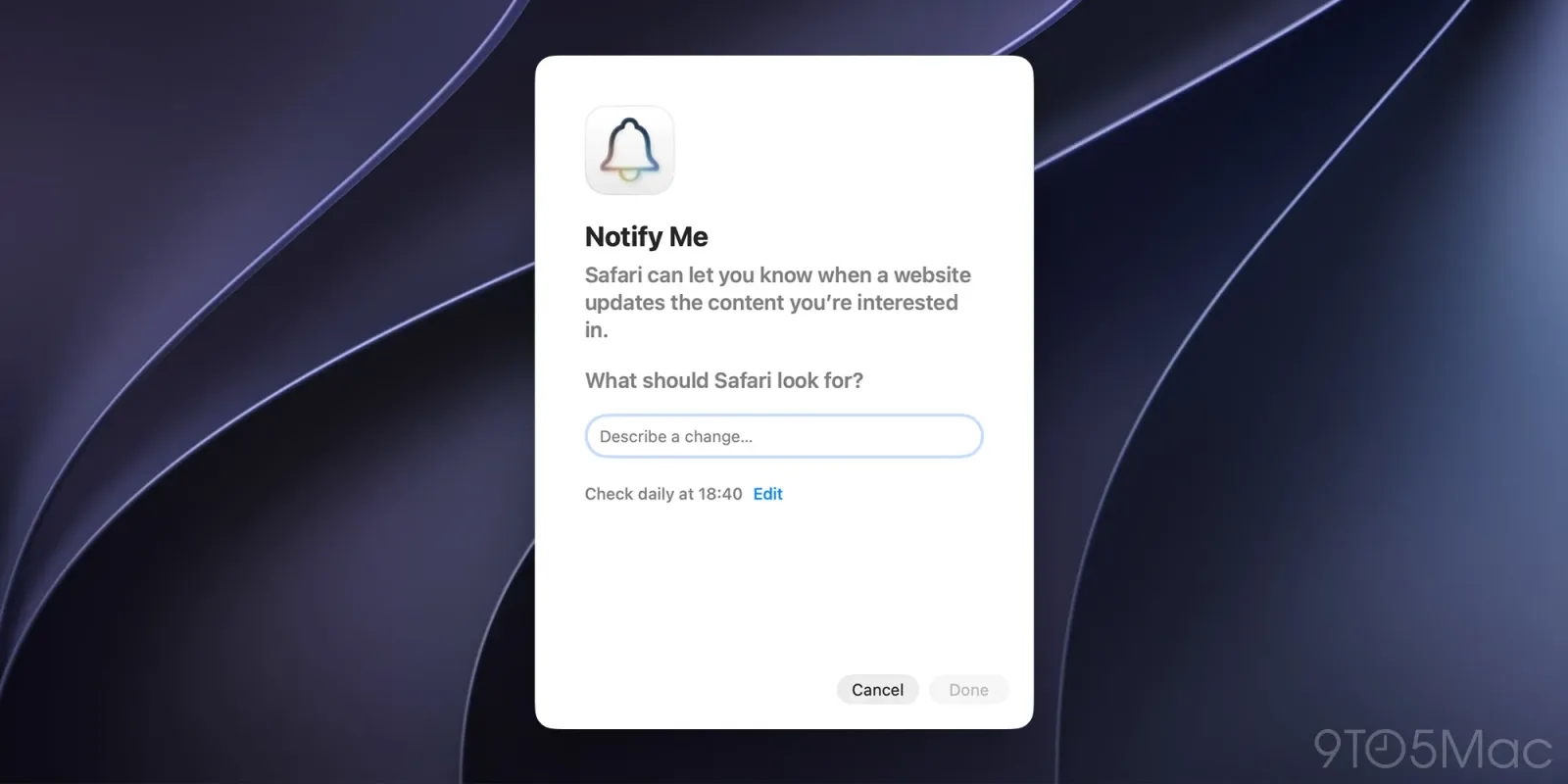
Apple is quietly reshaping how we interact with the web in macOS 27 Golden Gate. The most significant change is not a visual overhaul but a functional one. Safari now includes a built-in Notify Me feature that lets users track specific content on websites. This eliminates the need for clunky browser extensions or third-party monitoring services for many common use cases.
According to reporting from 9to5Mac, this feature integrates directly into the browser interface. Users can simply tap a button to start receiving alerts when a page updates. The implementation feels native and seamless. It removes the friction of installing separate tools just to know when a news article or product page changes.
This move has major implications for the extension economy. For years, users have relied on tools like Distill Web Monitor to track page changes. Apple is effectively competing with that entire category of software. This suggests a strategic push to keep users within the Apple ecosystem for utility tasks. It reduces dependency on external developers for basic web monitoring needs.
The privacy angle is also worth noting. Apple has always positioned Safari as a privacy-first browser. By handling notifications locally or through Apple servers, they avoid sending browsing data to third-party extension developers. This aligns with their broader narrative of controlling the user experience and data flow. It is a smart play for users who are increasingly wary of extension permissions.
From a workflow perspective, this feature is ideal for tracking dynamic content. You might want to know when a specific research paper is updated or when a job posting changes status. The native integration means faster setup and fewer permission prompts. It is a subtle but powerful quality of life improvement for power users.
However, the feature may have limitations compared to specialized tools. Advanced users might still need complex regex patterns or deep DOM scanning. Apple’s solution likely focuses on the most common use cases. It is a streamlined approach that prioritizes ease of use over granular control. This trade-off will likely satisfy the majority of casual users.
What this means for you is that you can simplify your browser setup. You no longer need to manage multiple extensions for basic tracking. Try using the Notify Me feature for any page you check frequently. It is a low-effort way to stay updated without cluttering your workflow. Here is a prompt you can use to refine your tracking strategy: "List the top five websites I visit daily that update frequently and suggest how I can use Safari's Notify Me feature to stay updated without checking manually."
Reporting basis: original story
← back to The Wire


![Anker's 25W MagSafe 3-in-1 packs active cooling in a travel-sized design [Hands-on]](https://aideaflow.com/api/img/news/ec6b40f3aa14a29b.webp)
![Best iPhone 18 Pro cases now available for purchase [Update #2]](https://aideaflow.com/api/img/news/8baf227a911059d3.webp)
![Craig Federighi on how Apple helps developers make the most of the iPhone Duo [Video]](https://aideaflow.com/api/img/news/41c87e96bc7f71e2.webp)