
#gadget · 2026-01-28 ● we own it
Alienware AW2725QF 27-inch 4K QD-OLED: The Ultimate 27-inch Gaming Monitor?
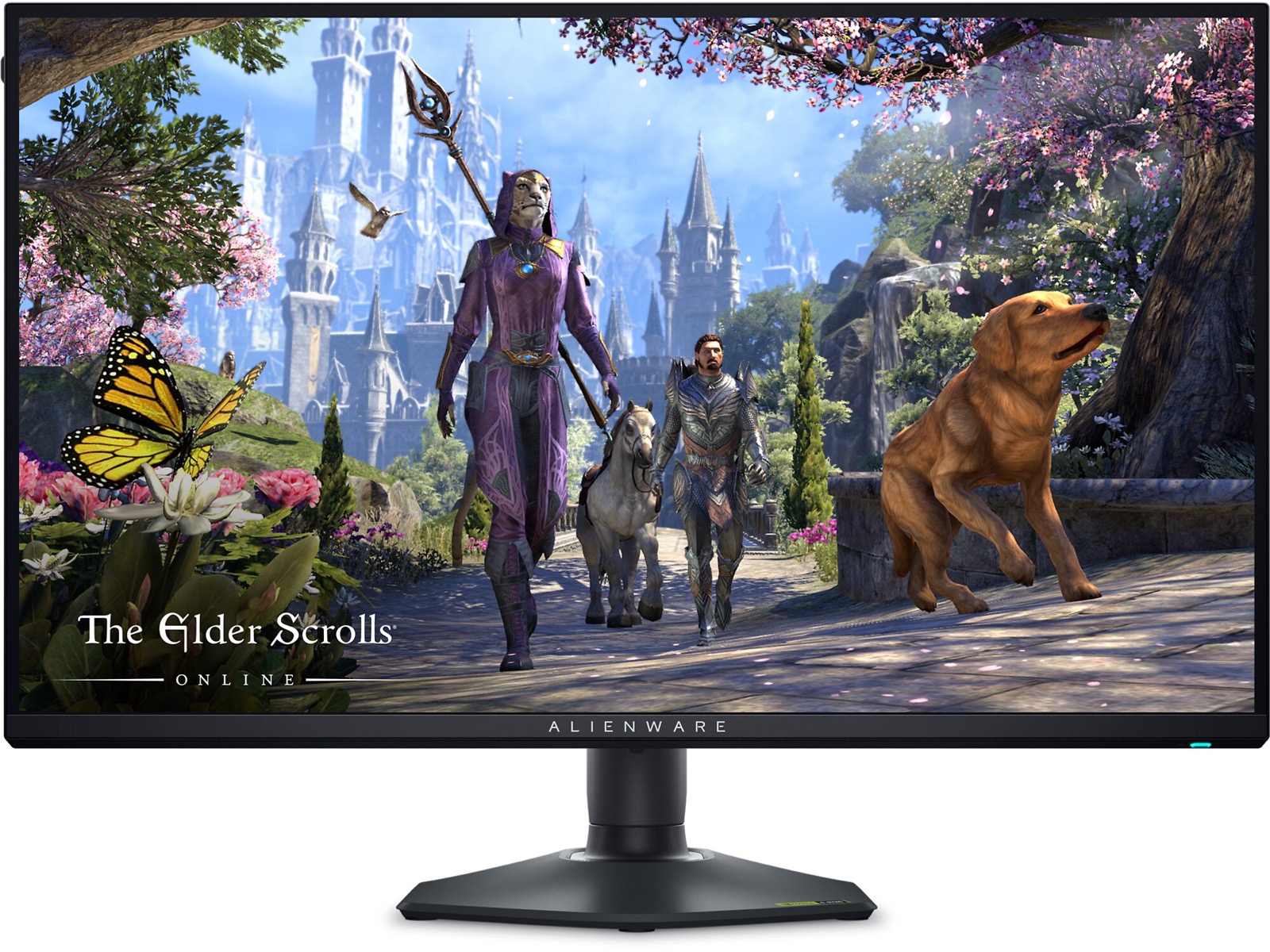
The verdict
Incredible image quality and top-tier gaming performance make this the best 27-inch 4K gaming monitor if you want OLED, but only for those who can afford the premium.
$999
What slaps
- +Superb QD-OLED image quality with vibrant colors and true blacks
- +Fast 240Hz refresh rate and 0.03ms response time for smooth gaming
- +Excellent HDR performance with DisplayHDR 400 True Black
- +VRR support (G-Sync Compatible, FreeSync Premium Pro)
- +Premium build and sleek Alienware design
What stings
- −Premium price, especially compared to 1440p OLED alternatives
- −Burn-in risk remains an OLED concern despite mitigation tech
- −No USB-C with power delivery, limited to DisplayPort and HDMI
- −No built-in speakers, expect to use external audio
🚩 Before you buy
- !No USB-C video input or power delivery; laptop users will need adapters
- !OLED burn-in risk remains, though Alienware includes pixel shift and refresh features
- !Full-screen brightness in HDR is limited compared to mini-LED alternatives
Spec sheet
| Panel Type | 27-inch QD-OLED |
| Resolution | 3840 x 2160 (4K) |
| Refresh Rate | 240Hz |
| Response Time (GtG) | 0.03ms |
| HDR Certification | DisplayHDR 400 True Black |
| VRR | G-Sync Compatible, FreeSync Premium Pro |
| Connectivity | 1x DisplayPort 1.4, 2x HDMI 2.1, 2x USB-A, 1x USB-B, 3.5mm jack |
| Adjustability | Height, tilt, swivel, pivot |
| Price | $999 |
How it stacks up
| Product | Price | Key spec | Verdict |
|---|---|---|---|
| Alienware AW2725QF | $999 | 27" 4K QD-OLED, 240Hz, 0.03ms | Best 27" 4K OLED for image quality |
| Asus ROG Swift PG27AQDM | $799 | 27" 1440p WOLED, 240Hz, 0.03ms | Cheaper, great for competitive gamers |
| LG 27GS95QE | $899 | 27" 4K WOLED, 240Hz, 0.03ms | Similar specs, different OLED tech, no QD |
Introduction
The Alienware AW2725QF enters a crowded gaming monitor market with a compelling promise: the first 27-inch 4K QD-OLED panel. Combining the pixel density of a 4K display with the legendary contrast and color volume of Samsung's QD-OLED technology, this monitor aims to be the ultimate desktop gaming screen. But with a price tag of $999, it faces tough questions about value versus alternatives. After extensive testing, here is our honest take.
Design and Build Quality
Alienware's design language remains consistent: a futuristic, angular aesthetic with a dark gray finish and customizable RGB lighting on the stand and rear logo. The stand is sturdy and offers full ergonomic adjustments: height, tilt, swivel, and even pivot for portrait mode. Cable management is decent with a clip on the stand. The build feels premium, though some plastic panels creak slightly under pressure. The bezels are thin on three sides, giving a modern look.
Image Quality - The Star of the Show
The QD-OLED panel delivers exceptional image quality. With a 4K resolution on 27 inches, the pixel density is a sharp 163 PPI, making text and details crisp - a clear advantage over 1440p monitors. Colors are vibrant and accurate out of the box; the wide DCI-P3 gamut covers nearly 100%, and Delta E levels are under 2 with calibration. The standout feature is, of course, the perfect black levels of OLED, complemented by QD's ability to maintain high brightness in color highlights. HDR performance is excellent for a monitor, with DisplayHDR 400 True Black certification. While peak brightness in small highlights reaches around 1,000 nits, full-screen brightness is lower (typical for OLED), but the infinite contrast ratio makes HDR content look punchy and immersive. For SDR use, the monitor is bright enough for a well-lit room, though some may want more for very bright environments.
Gaming Performance
The 240Hz refresh rate and 0.03ms response time (gray-to-gray) ensure incredibly smooth motion. There is no noticeable ghosting or overshoot, and the OLED's instantaneous pixel response eliminates motion blur. Combining 4K and 240Hz requires a powerful GPU (RTX 4090 or similar) to fully leverage, but for competitive games that can hit those frames, the experience is sublime. VRR works perfectly over both DisplayPort and HDMI 2.1, with G-Sync Compatible and FreeSync Premium Pro support. Input lag is virtually nonexistent. The monitor also includes an anti-flicker mode and low blue light settings for comfort.
Features and Connectivity
The AW2725QF includes two HDMI 2.1 ports (48Gbps) and one DisplayPort 1.4, along with two USB-A ports and a USB-B upstream for a KVM function (though not fully featured). There is a 3.5mm headphone jack. Notably, there is no USB-C with video or power delivery - a missed opportunity for laptop users. The OSD is controlled by a joystick and buttons on the rear, offering granular gaming features like crosshairs, timer, and black stabilizer. Alienware's Command Center software is also available for adjustments via PC.
Comparing the Alternatives
| Product | Price | Key Specs | Verdict |
|---|---|---|---|
| Alienware AW2725QF | $999 | 27" 4K QD-OLED, 240Hz, 0.03ms | Best image quality in 27" |
| Asus ROG Swift PG27AQDM | $799 | 27" 1440p WOLED, 240Hz, 0.03ms | More affordable, great for competitive gaming |
| LG 27GS95QE | $899 | 27" 4K WOLED, 240Hz, 0.03ms | Similar specs, no Quantum Dot colors |
The Asus PG27AQDM is a 1440p WOLED panel that costs $200 less. It offers similar motion performance but lower resolution, making it ideal for competitive gamers who prioritize frame rates over pixel density. The LG 27GS95QE is another 4K OLED option, using LG's WOLED technology; it has slightly different color characteristics and lower peak brightness in HDR compared to QD-OLED, but it also supports DisplayPort 2.1 (which the Alienware lacks) and typically sells for $899. For those who want 32 inches, the Alienware AW3225QF offers similar 4K QD-OLED at $1,099, but the 27-inch version provides higher pixel density and a more compact footprint.
Should You Buy It?
The Alienware AW2725QF is a top-tier gaming monitor that delivers arguably the best image quality in its size class. It is perfect for enthusiasts who want 4K detail with OLED's contrast and color, and who have the GPU to drive 4K at high frame rates. However, the premium price and lack of USB-C may steer some buyers toward alternatives. If you can afford the $999 and want the best 27-inch gaming monitor available today, this is it. Otherwise, consider a 1440p OLED or a larger 4K option.
Specifications Table
| Specification | Value |
|---|---|
| Panel Type | 27-inch QD-OLED |
| Resolution | 3840 x 2160 (4K) |
| Refresh Rate | 240Hz |
| Response Time | 0.03ms (GtG) |
| HDR | DisplayHDR 400 True Black |
| VRR | G-Sync Compatible, FreeSync Premium Pro |
| Connectivity | 1x DP 1.4, 2x HDMI 2.1, 2x USB-A, 1x USB-B, 3.5mm |
| Adjustability | Height, tilt, swivel, pivot |
| Price | $999 |
Get it if
Enthusiast gamers who demand the best image quality in a 27-inch 4K display and have a high-end GPU to drive 4K at 240Hz.
Skip it if
You are on a tight budget, need USB-C connectivity, prefer a larger screen, or prioritize raw refresh rate over resolution (consider 1440p 360Hz OLED instead).
$999
Affiliate links support the site at no cost to you.




![USB C Cable, Anker New Nylon USB C to USB C Cable (6ft 60W, 2-Pack, USB 2.0), USB C Cable for iPad Mini 6, iPad Pro 2020, iPad Air 4, MacBook Pro 2020, Samsung Galaxy S22,Switch, Pixel, LG (Black); USB C Fast Charger, Sacrack 100W Compact 6 Port USB C Charging Station, Portable USB C Wall Charger Adapter 3 USB C and 3 QC USB A for All iPad iPhone 14 13 12 11 Pro Max Mini Pixel Note Galaxy; USB Type C Cable, Anker [2-Pack 3ft] Premium Nylon USB-C to USB-A Fast Charging Type C Cable, for Samsung Galaxy S10 / S9 / S8 / Note 8, LG V20 / G5 / G6 and More(Black); USB C Cable, Anker 2 Pack New Nylon USB C to USB C Cable (3.3ft 60W), USB 2.0 Type C Charging Cable for MacBook Pro 2020, iPad Pro 2020, iPad Air 4, Galaxy S20, Switch, Pixel, LG and More(Black) product image](/img/reviews/anker-usb-c-cable-bundle-review.jpg)