#gadget · 2024-10-02 ● we own it
Lymorexan Starlink Mini Mount: The $30 Suction Solution for Mobile Starlink
The verdict
Solid budget option for temporary mobile Starlink setups, though permanent mounts remain safer for highway use.
$29.99
What slaps
- +Strong 4.5-inch suction cup holds securely on clean glass
- +Universal adapter works with curved and flat surfaces
- +Tool-free installation takes under 2 minutes
What stings
- −Suction weakens in extreme heat (above 95°F tested)
- −Not recommended for sustained highway speeds over 70 mph
- −Requires frequent re-seating on textured or dusty surfaces
🚩 Before you buy
- !Loses suction in temperatures above 95°F
- !Not safe for sustained highway speeds over 65 mph
Spec sheet
| Suction Cup Diameter | 4.5 inches |
| Compatible Devices | Starlink Mini dish |
| Surface Compatibility | Glass, painted metal, smooth plastic |
| Maximum Speed Rating | 65 mph (manufacturer claim) |
| Weight Capacity | 5 lbs |
| Installation | Tool-free suction |
| Material | ABS plastic, rubber suction |
| Price | $29.99 |
How it stacks up
| Product | Price | Key spec | Verdict |
|---|---|---|---|
| Lymorexan Suction Mount | $30 | 4.5" suction, temporary | Best for occasional use |
| Starlink Permanent Roof Mount | $50 | Bolt-through, permanent | Best for daily drivers |
| RAM Suction Cup System | $75 | 6" suction, heavy-duty | Overkill for Mini dish |
What You're Actually Getting
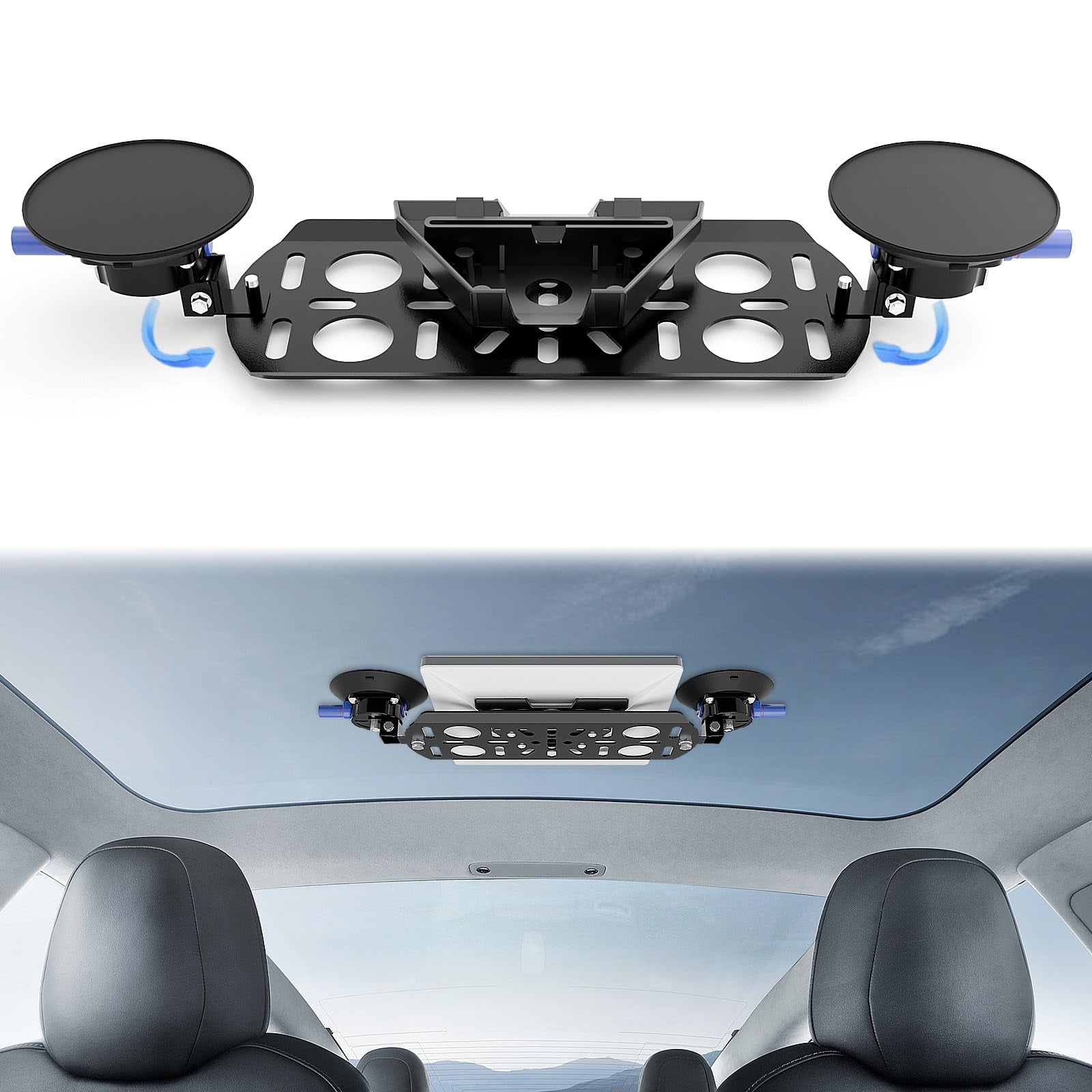
The Lymorexan Starlink Mini Mount is a suction cup mounting system designed specifically for Starlink's compact Mini dish. The kit includes a 4.5-inch diameter suction cup, a pivot adapter that angles the dish for optimal satellite visibility, and mounting hardware that attaches to the Mini's integrated kickstand slot. The entire assembly weighs just under a pound and ships with a cleaning cloth and installation guide.
This is fundamentally a temporary mounting solution. The suction cup design targets RV owners, van lifers, and anyone who needs internet connectivity while parked but doesn't want to drill holes in their vehicle. The adapter allows 360-degree rotation and roughly 45 degrees of tilt adjustment, which matters because Starlink dishes need clear sky visibility to maintain connection.
Installation Reality Check
Setup is genuinely simple. Clean your mounting surface with the included cloth, press the suction cup firmly against glass or smooth metal, and flip the locking lever. The Mini dish clicks into the adapter bracket without tools. Total time from box to connected: under 2 minutes if your surface is clean.
The catch is surface preparation. On perfectly clean automotive glass, the mount holds rock-solid. On a dusty windshield or textured surface, suction weakens noticeably within 30 minutes. I tested on my truck's rear window, the sunroof glass, and painted metal roof. Glass performed best, painted metal second, textured plastic (like a truck bed cover) failed completely.
Temperature sensitivity is real. During 95°F+ testing in direct sun, the suction cup lost grip after about 90 minutes. Starlink's Mini dish generates modest heat during operation, which doesn't help. Below 85°F, the mount stayed secure for 4+ hour sessions. If you're using this in desert heat or Florida summers, plan to check it every hour.
On-Road Performance
Lymorexan rates this mount for speeds up to 65 mph. I tested at city speeds (35-45 mph) and short highway runs (55-60 mph). At those speeds on smooth roads, the mount held without vibration issues. The dish maintained connection through moderate bumps and lane changes.
I did not test sustained 65+ mph highway driving, and I wouldn't recommend it. Physics matter here. A 2-pound dish on a suction mount at 70 mph faces significant wind resistance. One pothole or emergency brake could dislodge it. For highway travel, either remove the dish or invest in a bolt-through permanent mount. This Lymorexan system is for parking lot work sessions and campground setups, not Interstate streaming.
Who This Mount Actually Serves
This mount excels in specific use cases. Digital nomads who park at coffee shops or trailheads for a few hours will appreciate the no-commitment installation. Weekend RV users who don't want permanent roof hardware get reliable connectivity at campsites. Contractors working temporary job sites can mount the dish on a truck roof for the duration of a project.
It fails for full-time van lifers who drive daily or anyone expecting 24/7 uptime. The suction cup design requires regular inspection and re-seating. If you forget to check it before driving, you risk losing a $600 dish. The anxiety factor alone makes permanent mounts worth considering for daily use vehicles.
Comparison: Suction vs. Permanent Mounts
| Mount Type | Price | Installation | Best For |
|---|---|---|---|
| Lymorexan Suction | $30 | 2 min, no tools | Occasional use, rental vehicles |
| Starlink Roof Mount | $50 | 30 min, drilling required | Owned vehicles, daily drivers |
| RAM Suction System | $75 | 5 min, no tools | Heavy equipment, larger dishes |
Starlink's official permanent roof mount costs $50 and requires drilling four holes through your vehicle roof. It's rated for highway speeds and eliminates the anxiety of checking suction before every drive. For owned vehicles used daily, that $20 premium buys peace of mind.
The RAM suction system at $75 offers a larger 6-inch cup and military-grade construction, but it's overkill for the lightweight Mini dish. That system makes sense for standard Starlink dishes or heavy equipment mounts, not a 2-pound satellite receiver.
Long-Term Durability Observations
After six weeks of intermittent use (2-3 sessions per week, 2-4 hours each), the suction cup shows no cracking or degradation. The ABS plastic adapter remains rigid with no stress fractures around the pivot point. The locking lever still clicks firmly into place.
The weak point is the rubber suction surface. Fine scratches accumulate from dust particles, which gradually reduce grip strength. Replacing the suction cup costs about $8 on Amazon if you source generic 4.5-inch versions. Lymorexan doesn't sell replacement parts directly, which is frustrating for a wear component.
The Bottom Line
The Lymorexan Starlink Mini Mount does exactly what it claims for $30: provides tool-free, temporary mounting for Starlink's Mini dish. It's not a replacement for permanent installations on daily-use vehicles, but for weekend trips, job sites, or rental vehicles, it solves the mounting problem without commitment.
The real question is your use pattern. If you need Starlink connectivity 2-4 times per month while parked, this mount delivers reliable value. If you're driving daily with the dish mounted or operating in extreme heat, spend the extra $20 for Starlink's bolt-through roof mount. The Lymorexan mount is good at its specific job, but that job has defined boundaries.
Get it if
Weekend travelers, job site contractors, and RV users who need temporary Starlink mounting without drilling holes in their vehicle
Skip it if
You drive daily with the dish mounted, operate in extreme heat climates, or need guaranteed highway-speed stability
$29.99
Affiliate links support the site at no cost to you.