#smart-home · 2026-04-01
UniFi Travel Router Review: Almost Perfect, One Software Fix Away
The verdict
The UniFi Travel Router delivers incredible value at $79 with Teleport VPN, camera integration and a pocketable form factor. The captive portal reauthentication issue needs a software fix, but even with that flaw, this is the best travel router available if you can find one in stock.
$79
What slaps
- +Teleport VPN connects back to your home UniFi network with one click, no configuration needed
- +Pocketable at 89g and powered by any USB-C source including phone chargers and power banks
- +G6 Instant camera integration through Teleport turns any hotel room into a monitored space
- +Two Gigabit Ethernet ports for wired devices in hotel rooms
- +USB-C tethering from your phone works as a backup internet source
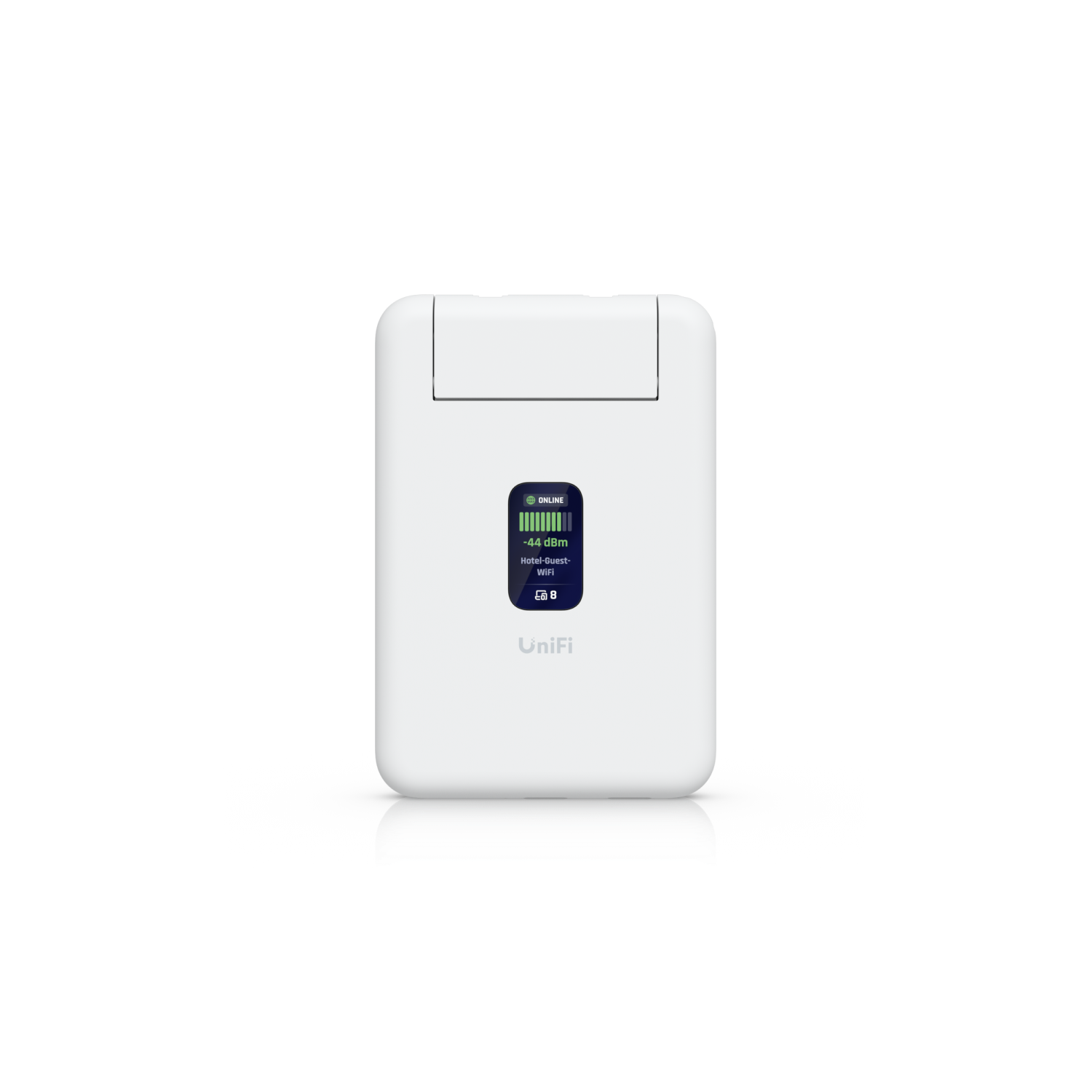
- +1.14-inch status screen shows connection info at a glance
- +NDAA compliant for government and enterprise use
- +Site binding auto-configures WiFi and Teleport from your home network settings
What stings
- −Hotel WiFi captive portals expire after 6-8 hours, requiring manual reauthentication through the app
- −WiFi 5 only in 2026, no WiFi 6 or 6E support
- −Constantly out of stock on UI.com, selling out within minutes of restocks
- −No power adapter included, USB-C cable and charger required
- −App-only management with no web interface
- −Teleport VPN tunnel can occasionally drop and need manual reconnection
🚩 Before you buy
- !Captive portal reauthentication does not work automatically despite expectations
- !Constantly out of stock, with scalpers charging 2.5-3x markup
- !WiFi 5 only, no WiFi 6 support in a 2026 product
- !App-only management with no web interface fallback
Spec sheet
| Model | UTR (UTR-US) |
| Price | $79 |
| WiFi | WiFi 5 (802.11ac), 2x2 MIMO |
| Bands | 2.4 GHz + 5 GHz |
| Max Data Rate | 866.7 Mbps (5 GHz) |
| Ethernet | 2x Gigabit RJ45 (1 WAN, 1 LAN) |
| USB-C | 2 ports (1 power, 1 tethering) |
| Power | 5V/2A USB-C, 5W max |
| Dimensions | 95.95 x 65 x 12.5 mm |
| Weight | 89g (3.1 oz) |
| Display | 1.14-inch status screen |
| VPN | Teleport, OpenVPN, WireGuard |
| Uplink Options | WiFi, Ethernet, USB-C phone tethering |
How it stacks up
| Product | Price | Key spec | Verdict |
|---|---|---|---|
| UniFi Travel Router (UTR) | $79 | Teleport VPN, 89g, WiFi 5, camera integration, NDAA compliant | Best travel router for UniFi ecosystem users |
| GL.iNet Beryl AX (GL-MT3000) | $89 | WiFi 6, OpenWrt, WireGuard, more range, no ecosystem integration | Better specs but no Teleport magic |
| TP-Link TL-WR902AC | $40 | WiFi 5, basic features, no VPN, pocket-sized | Budget option but missing everything that makes travel routing useful |
| Slate AX (GL-AXT1800) | $110 | WiFi 6, OpenWrt, AdGuard, VPN client, larger form factor | More powerful but bigger and no UniFi integration |
Why I Bought a Travel Router
Hotel WiFi is terrible. It is slow, insecure, and every device needs to authenticate separately through a captive portal. When I travel, I bring a laptop, phone, iPad, and sometimes a camera. Connecting each one individually to hotel WiFi and accepting terms of service four times is annoying. A travel router solves this by connecting to the hotel WiFi once, then broadcasting its own secure network that all my devices connect to automatically.
But the UniFi Travel Router does something no other travel router can: Teleport. With one tap in the UniFi app, it creates a VPN tunnel back to my home network. My devices think they are at home. My UniFi Protect cameras work. My local services are accessible. My DNS filtering applies. It is not just a travel router, it is a portable extension of my home network.
The New Orleans Test
On my most recent trip to New Orleans, I decided to test the UTR with a real-world security use case. I packed a UniFi G6 Instant camera, one of the only WiFi cameras Ubiquiti offers with edge AI compared to the older G4. They kind of jumped the G5 on that one, not sure why, but the G6 has proper on-device person detection.
Setup was straightforward. I plugged the UTR into the hotel room outlet using a USB-C charger, connected it to the hotel WiFi through the UniFi app, authenticated through the captive portal once, then enabled Teleport. The G6 camera connected to the UTR's WiFi network and, through Teleport, appeared on my home UniFi Protect console. I set it to events-only recording pointed at the hotel room door to see if anyone came in while we were out.
For the first six to eight hours, it worked flawlessly. I got a test notification that the camera detected motion when the housekeeper opened the door. The setup was recording, Teleport was tunneling footage back to my home UNVR, and I could check the live view from my phone while walking around the French Quarter. It felt like having a home security system in a hotel room.
The Captive Portal Problem
Then I got a notification that the G6 camera disconnected. I knew immediately what happened: the hotel WiFi session expired and the UTR lost its upstream connection. The captive portal required reauthentication, which meant opening the UniFi app, navigating to the UTR, and manually clicking through the hotel's terms of service page again.
This is the single biggest issue with the UTR. Hotel captive portals typically expire sessions every 6 to 12 hours. The UTR has no mechanism to automatically reauthenticate. When the session expires, everything downstream dies. Your camera, your VPN tunnel, all your connected devices lose internet until you manually fix it.
From what I understand, the UTR was advertised as handling captive portals automatically. In reality, it handles the initial authentication but not the re-authentication. This needs a software update. Hint hint, Ubiquiti. A simple periodic HTTP check that detects a captive portal redirect and either auto-reauthenticates or sends a push notification would solve this entirely.
Hardware Is Phenomenal
The hardware itself is beyond what you would expect for $79. At 89 grams and roughly the size of a credit card (just thicker), it genuinely fits in a pocket. The 1.14-inch status screen shows your connection status, connected clients, and data usage without needing the app. Two Gigabit Ethernet ports mean you can hardwire a laptop in a hotel room. USB-C power from any charger or power bank means no proprietary adapters.
Build quality is typical Ubiquiti, which means excellent. The polycarbonate shell feels solid, the ports have good retention, and the device runs cool even after hours of continuous use.
WiFi 5 in 2026
A lot of people online, especially on Reddit, complain about the UTR only supporting WiFi 5. I get the criticism on paper, but in practice it does not matter for this use case. Hotel WiFi is the bottleneck, not the router. You are not getting WiFi 6 speeds from a hotel network that maxes out at 50 Mbps shared among hundreds of guests. WiFi 5 at 866 Mbps is more than enough to be the faster link in the chain.
If I needed range, I would bring a real router. The UTR is for convenience on the go. It does that job perfectly. The people wanting WiFi 6E on a pocket router are solving the wrong problem.
The Scalper Situation
This thing is so popular that scalpers are flipping travel routers. I never thought I would see that. Ubiquiti drops batches of roughly 1,000 units with no advance notice. They sell out within minutes. I see it with our UI.com inventory tracker. It comes in stock almost daily, stays available for maybe an hour, then sells out completely. Sometimes it is out for days before the next drop.
On eBay, scalpers are selling them for $200 to $300. For a $79 router. The demand is genuinely insane, and it tells you something about how well Ubiquiti positioned this product. There is nothing else like it at this price point with this level of ecosystem integration.
What Ubiquiti Needs to Fix
The UTR is one software update away from being a perfect product. Here is my list:
First and most importantly, automatic captive portal reauthentication. Detect when the upstream connection drops due to a captive portal session expiry and either auto-reauthenticate or push a notification to the user's phone. This single fix would eliminate the biggest pain point.
Second, improve Teleport tunnel stability. The VPN occasionally drops and needs manual reconnection. A persistent tunnel with automatic reconnection would make the remote camera use case bulletproof.
Third, add a web interface as a fallback. App-only management works most of the time, but when the app has issues or you want to configure something from a laptop, having no web interface is frustrating.
Who Should Buy This
If you are in the UniFi ecosystem, this is a no-brainer at $79. The Teleport integration alone is worth it. Being able to extend your home network to any location in the world with one tap is genuinely magical. Add in the security camera use case, and this becomes essential travel gear.
If you are not in the UniFi ecosystem, the GL.iNet Beryl AX gives you better specs and OpenWrt flexibility for $10 more. But you lose Teleport, which is the UTR's killer feature.
The hard part is actually buying one. Good luck finding it in stock.
Get it if
UniFi ecosystem users who travel regularly and want secure, seamless network access on the road. Especially valuable for setting up temporary Protect cameras in hotel rooms or Airbnbs.
Skip it if
You are not in the UniFi ecosystem (the GL.iNet alternatives offer better standalone value), or you need guaranteed uptime in locations with aggressive captive portals.
$79
Affiliate links support the site at no cost to you.