#gadget · 2026-06-09
PONGBOT Pace S Pro Review: An AI Tennis Robot That Tracks You
The verdict
The smartest portable tennis ball machine for serious solo players, if you can stomach a price that rivals a used car payment.
$1,249
What slaps
- +AI player tracking feeds the ball to the open court, not a fixed spot
- +Dual motors deliver real topspin and backspin up to 80 mph
- +150-ball hopper and 8 plus hours of battery for long sessions
- +App control with drills, oscillation, and adjustable feed timing
What stings
- −Very expensive at $1,249, far above basic ball machines
- −Heavy at 19 kg, so moving it solo is a workout
- −Smart AI features are exclusive to the Pro, not the cheaper Pace S
Spec sheet
| Ball Capacity | 150 balls |
| Max Ball Speed | 80 mph |
| Spin | Dual motor topspin and backspin |
| Battery Life | 8 plus hours |
| AI Tracking | Camera-based player position tracking |
| Control | PONGBOT app, remote, on-unit panel |
| Net Weight | 19 kg |
| Sports | Tennis |
| Price | $1,249 |
How it stacks up
| Product | Price | Key spec | Verdict |
|---|---|---|---|
| PONGBOT Pace S Pro | $1,249 | 80 mph, AI tracking, 150 balls | Smartest pick |
| PONGBOT Pace S | $899 | 80 mph, no AI tracking | Same body, fewer brains |
| Spinshot Player | $1,099 | 68 mph, programmable drills | Proven, no AI camera |
Affiliate disclosure: this review contains affiliate links. As an Amazon Associate and through other partner programs we may earn a commission if you buy through these links, at no extra cost to you. We only recommend gear we would train with ourselves.
What Makes This One Different
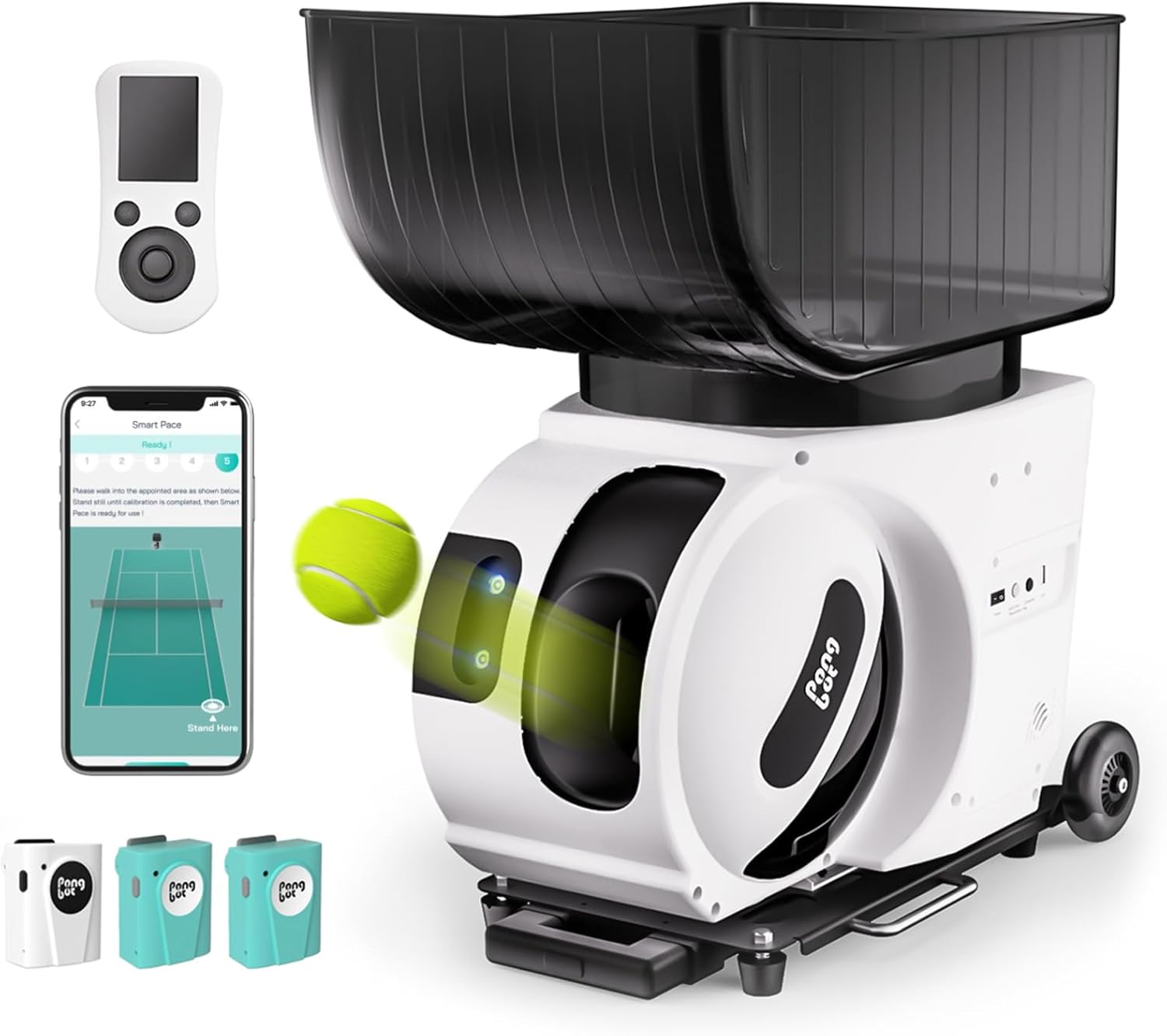
A traditional tennis ball machine is a glorified cannon. It fires balls to a preset zone and you run to them. The PONGBOT Pace S Pro adds a camera that watches where you stand and aims the next ball away from you, into the open part of the court. Instead of feeding the same corner forever, it makes you move the way an opponent would, and that single feature is what separates the Pro from every dumb machine at this price.
It is billed as the world's first true AI tennis ball machine, and after using it the framing holds up. The tracking is not a tech-demo afterthought, it is the core of how you practice with it. That is the lens to judge it through.
Power and Spin Are Genuinely Strong
Underneath the AI, the fundamentals are excellent. Two independent motors generate the ball speed and spin, and they can spin the ball both ways for heavy topspin or biting backspin. Top ball speed is 80 mph, which is fast enough to challenge advanced players and not just feed gentle loops to beginners.
The dual-motor design matters because single-motor machines fake spin and feel mushy at speed. The Pace S Pro hits with pace and bite that reads like a real shot off a real racket. For drilling specific strokes, having true topspin and backspin on demand is worth a lot.
Endurance and Capacity
The hopper holds 150 balls and the battery is rated for more than eight hours of use. In practice that means you can run a long session, or several shorter ones across a week, without thinking about a charger. The limiting factor becomes how many balls you own and how often you want to pick them up, not the machine.
Battery powered with no cord also means you are not hunting for an outlet at the court. You wheel it on, you train, you wheel it off. For anyone whose courts do not have convenient power, the all-day battery is a bigger deal than the spec sheet makes it sound.
The App and Drills
The PONGBOT app is where you set feed speed, spin, height, oscillation, and timing between balls, and where you trigger the AI tracking mode. You can build drills that move you side to side or deep and short, and the controls are clear enough that you are not fighting the software mid-session. A physical remote and an on-unit panel back it up for quick changes.
This is also the honest catch. The advanced smart features, including the AI tracking that justifies the whole purchase, are exclusive to the Pace S Pro. The cheaper Pace S shares the same body, speed, and battery but leaves the brains out. If the AI is why you are interested, the Pro is the only model that delivers it, and you pay for that.
The Weight Reality
At 19 kg this is a substantial unit. It has a handle and wheels, but loading it into a car trunk or carrying it up steps is a genuine lift. This is not a grab-and-go gadget, it is a piece of training equipment you commit to transporting. Factor that in if you do not have easy court access or a vehicle that swallows it easily.
Who Should Buy It
Buy the Pace S Pro if you are a dedicated tennis player who trains alone often and wants practice that actually moves you around the court. The AI tracking, true dual-motor spin, and all-day battery make it the most capable solo training partner in the portable class. For a committed player, it pays for itself versus hiring a hitting partner.
Who Should Skip It
Skip it if you are a casual player who hits a few times a month, in which case the price is impossible to justify and a basic machine or the standard Pace S is plenty. Skip it too if portability is critical and 19 kg is a non-starter for your setup.
Final Verdict
The PONGBOT Pace S Pro is the rare ball machine that earns the word smart. The camera-based player tracking changes solo practice from rote feeding into something that resembles a rally, and the dual-motor power and eight-plus-hour battery back it with real substance. The price is steep and the weight is real, but for a serious player who trains alone, this is the best in its class. It lands an 8 out of 10.
Get it if
Dedicated tennis players who practice solo and want a machine that tracks them and feeds to the open court, with true topspin and backspin and all-day battery
Skip it if
You are a casual player who cannot justify the price, or you need a lightweight machine and 19 kg is too much to transport
$1,249
Affiliate links support the site at no cost to you.